If the Infomap shows no data for this data source, open the data from the Data tab with View in infomap. If the message stays, collect the details below and contact Sodex support.
What the message refers to
The data source is the data the Infomap has open. It is either a data model (a processed model or import) or a snapshot (a capture from a machine in continuous mode). The data card at the top right names it, and Switch data source changes it.
Check the status
- Open the project and click Data.
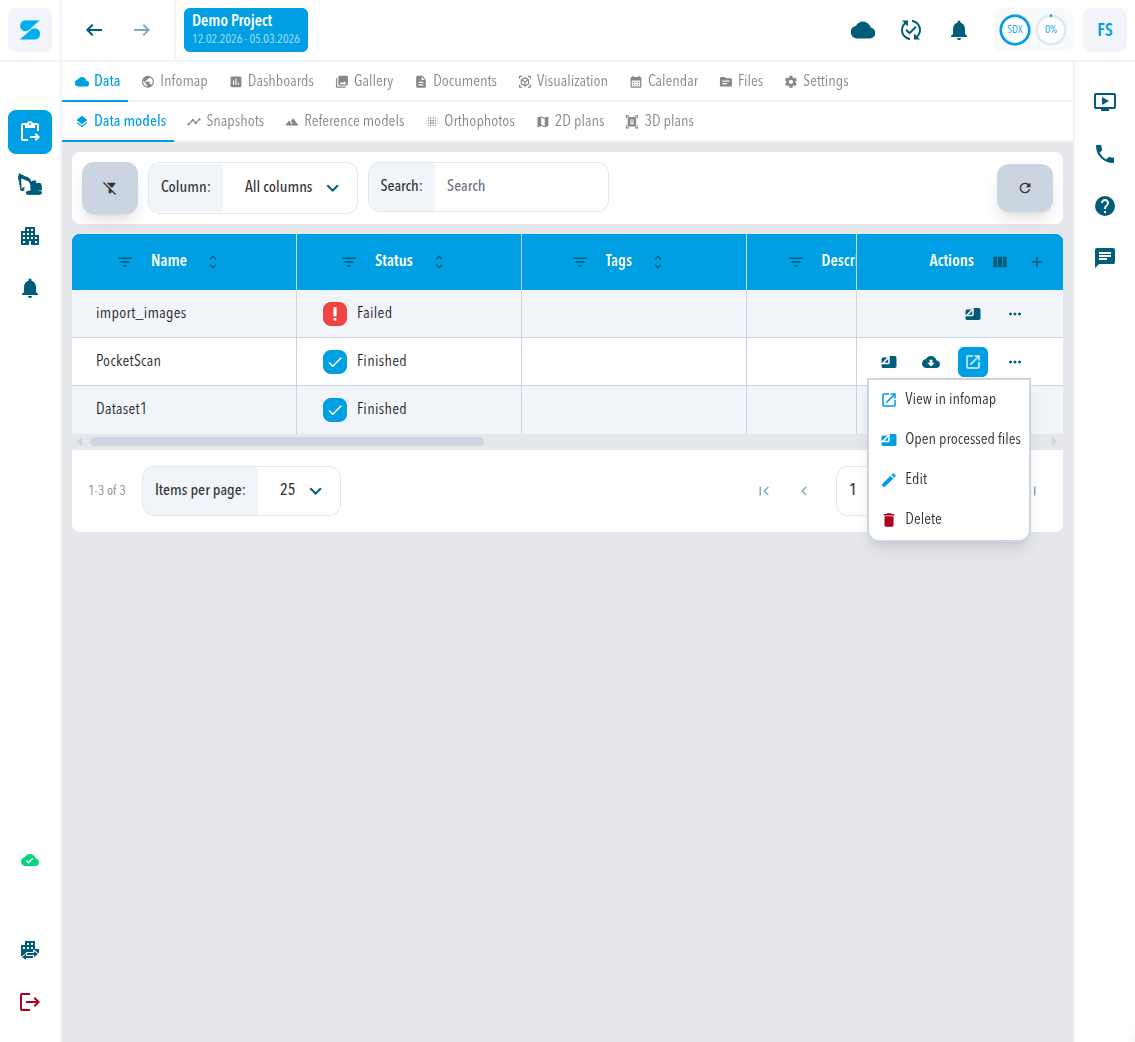
- Open the sub-tab that holds the data: Data models for processed models and imports, Snapshots for machine captures.
- Find the row and read its Status. A row that is not Finished is not ready to open.
Open the data from the Data tab
- In the row, click the three-dot menu under Actions.
- Click View in infomap.
- Wait until the map has loaded. The data card at the top right names the data source that is open.
Expected result
The Infomap shows the data source. You can continue to measure and export, see Export a point cloud, contours, or mesh.
If the message stays
Send these details to Sodex support so the case can be checked without another round trip:
- the link to the project
- whether the data source is a data model or a snapshot, its name, and its Status
- the browser you use
- whether the message appears every time or only sometimes
Comments
0 comments
Please sign in to leave a comment.